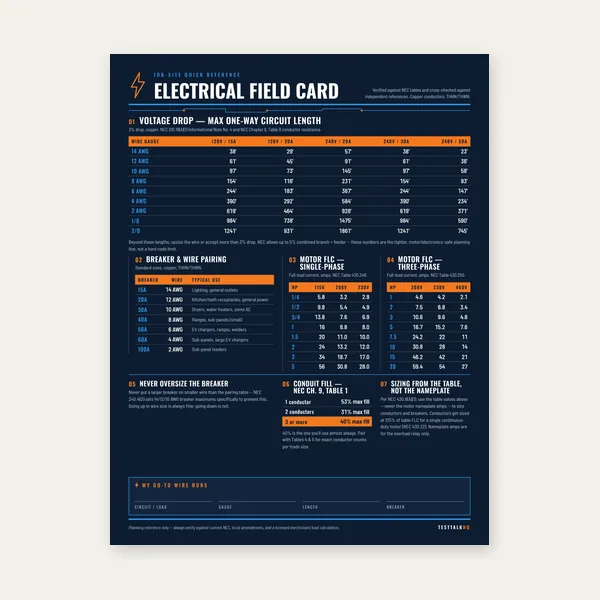
Electrical Reference Card
One page. Voltage drop lengths, breaker and wire pairing, motor FLC.
$3.99
BuyHeader fields, slot editing, multi-pole rules, and connected-load limits
Walk through the Panel Schedule Builder: panel header fields, clicking slots, NEMA odd/even columns, multi-pole spanning, and why the connected-load summary is not an NEC demand calculation.

Fill header info, click slots to add circuits, then export PDF or save JSON if you need more than one session.
Open Panel Schedule Builder →Panel name / ID, location, and fed from identify the board on drawings and in the field. Date tracks when the directory was last updated. Voltage / phase sets phase letters and leg math (120/240V 1Ø, 120/208V 3Ø, or 277/480V 3Ø). Main type, main amperage, bus rating, and total positions print on the PDF header — they do not block export if left blank, but AHJs expect accurate values.
Click any circuit number or row cell to open the editor. Choose load type (lighting, receptacle, HVAC, motor, appliance, general, spare, or space). Enter description, breaker trip, wire size, and optional connected VA. Space marks a physical blank with no breaker; spare reserves a breaker with no load assigned.
Odd circuit numbers run down the left column, even numbers down the right — circuit 1 top-left, 2 top-right, and so on. Phase letters alternate by row so you can see which leg each slot lands on. The on-screen grid and PDF export use the same convention.
1-, 2-, and 3-pole breakers must stay in one column on consecutive numbers (+2 per pole): a 2-pole at 5 occupies 5 and 7; a 3-pole at 1 occupies 1, 3, and 5. That is how a 240V load catches two different phase legs. The editor rejects placements that would cross columns or overlap another breaker.
Summary cards total the VA you entered and estimate leg amperes by dividing phase VA by line-to-neutral voltage. Leg balance compares max vs min leg current. This is a raw connected-load tally — not Article 220 demand, not continuous-load 125%, not largest-motor adders. For whole-panel NEC math, use the Residential Load Calculator or Commercial Load Calculator.
Before documenting a new branch, size its breaker and conductor with the Panel Schedule Calculator, then enter the approved trip and AWG here. The builder documents the full directory; the calculator sizes individual circuits.
One page. Voltage drop lengths, breaker and wire pairing, motor FLC.
$3.99
Buy
15 pages. Ampacity, corrections, voltage drop, motor circuits, conduit fill.
$12.99
Buy
Quote electrical work and flag panel headroom before you price it.
Excel or Google Sheets. Best on a computer.
$29.00
Buy
Card, 15-page guide and the estimator workbook. All six files.
Excel or Google Sheets. Best on a computer.
$34.99
$45.98 if bought separately — save $10.99
BuyCheckout opens in a new tab.