
Contractor Job Estimator
Price remodels and GC work, then send a quote with no internal numbers.
Excel or Google Sheets. Best on a computer.
$29.00
BuyDiagnose mislabels, leg imbalance, tandem traps, and directory failures when the schedule “looks complete”
Not another how-to-build walkthrough. Pair this with the Panel Schedule Calculator when the directory is filled in but the field still fails. For NEC 408.4 labeling rules and how to build a clean schedule, use How to Read and Build a Panel Schedule. This page stays on diagnosis.

Use this when the calculator schedule printed clean, the directory card looks neat, and you still kill the wrong circuit, trip the wrong leg, or fail inspection.
| Problem | What it usually means | First fix | Next tool |
|---|---|---|---|
| Label says kitchen; outlet is bath | Remodel leftovers or swapped hots; directory never re-traced | Trace with finder/outlet tester; rewrite that row only after confirm | Panel Schedule Calculator |
| Odd/even numbers do not match left/right bus | Directory written by space count, not manufacturer odd/even map | Open door; map bus phases first; renumber from factory legend | Panel Schedule Guide |
| Schedule “fits”; one leg runs hot | Large 120 V loads stacked on one phase; two-pole not paired | Clamp each leg under load; move circuits to rebalance | Sub-Panel Sizing Calculator |
| “Spare” trips / powers something | Blank or spare label on a live breaker; tandem counted as spare space | Energize-test every labeled spare; mark USED or SPACE correctly | Panel Schedule Calculator |
| Killing one breaker drops two rooms + shared neutral issues | MWBC / multiwire branch not identified as two poles / handle-tied | Identify shared neutrals; label both poles + MWBC note | Panel Schedule Guide |
What it looks like: You open the breaker labeled “Kitchen receptacles” and the bath GFCI dies instead. Or “Garage lights” kills the laundry. The schedule card is neat, dated, and wrong.
Likely causes: Remodel kept old labels while circuits were re-homed. Previous tech labeled by room intent, not by verified outlet. Shared junction boxes fed from a different breaker than the door card. Someone labeled before landing the conductors. Pencil marks faded; a later hand rewrote from memory.
Fixes: Treat every suspect row as unverified until you prove it. Use a receptacle tester or known load at the outlet, then open one breaker at a time. For hardwired loads, use a non-contact tester plus a controlled shutdown. After confirm, rewrite that single row in the Panel Schedule Calculator and reprint — do not batch-rewrite the whole card from memory.
What it looks like: You follow the card’s Cir 5 to the left column, third down — but the manufacturer map puts odds on the opposite side. Phase A vs B assumptions invert. Load balance “fixes” make imbalance worse.
Likely causes: Writing the directory top-to-bottom left column as 1,2,3… instead of factory odd/even. Mixing QO-style numbering with Homeline or CH conventions from another brand. Counting spaces including tandem half-slots as full circuit numbers. Ignoring the stamped numbers on the deadfront.
Fixes: Photograph the deadfront with numbers visible before you edit labels. Rebuild the schedule in the calculator using the stamped numbers as the source of truth. If you are balancing legs, clamp first — do not move breakers based on a hand-drawn odd/even guess. Refresh the map with How to Read and Build a Panel Schedule.
Wrong map = wrong phase math. Fix numbering before you chase “imbalance.”
Panel Schedule GuideWhat it looks like: Connected VA in the calculator is under the service rating. Breakers rarely trip. One lug or one bus feels hotter; one leg clamp reads 70–90 A while the other sits at 30–40 A under evening load.
Likely causes: Stacking many 120 V continuous loads (kitchen, laundry, office) on odd numbers only. Two-pole breakers entered as two independent 120 V rows so the calculator double-counts or mis-assigns phase. EV, HVAC, or dryer two-pole marked on one circuit number only. Ignoring that continuous loads need 125% demand treatment while the directory only lists nameplate VA.
Fixes: Clamp each ungrounded service conductor under representative load. Move 120 V breakers to the lighter leg using the real odd/even map. Ensure every 240 V load occupies a true two-pole adjacent pair on opposite legs. Rebuild demand in the Panel Schedule Calculator. If the panel is space-limited but ampacity-limited, capacity forks live on the existing decision pages (see below) — not on a new comparison article.
What it looks like: Card shows Cir 22 “SPARE.” You need a space for a new circuit and land it — then discover Cir 22 already feeds outdoor receptacles. Or the AHJ opens a blank and finds a breaker with no description.
Likely causes: Previous tech marked SPARE after pulling a load but left the breaker and feeders. Tandem half-slot counted as “space” on the card while it is occupied. Stickers fell off; someone wrote SPARE for anything unlabeled. Future-use knockout counted as a circuit row.
Fixes: Energize-test every SPARE and blank with a known load or NCV along the conductors. Relabel USED with a specific description, or true SPACE (no breaker). Empty spaces without breakers should not carry circuit numbers that imply a protective device. Update the calculator row and reprint before the next visit.
What it looks like: Panel is stamped 30 spaces / 40 circuits. Schedule has 40 rows. You try to add a full-size two-pole and there is no legal space. Or CTL (circuit total limiting) rejection: too many tandems for that bus.
Likely causes: Treating every half-slot as a full space in the schedule. Ignoring manufacturer CTL / rejection notches. Listing tandem A/B as two full circuit rows without marking “tandem in space X.” Planning a 240 V two-pole into a tandem-only position.
Fixes: Count physical spaces and allowed circuit count separately on the schedule header. Mark tandem pairs explicitly (e.g., “20A tandem — Space 12A/12B”). Before adding loads, confirm the bus accepts another twin. If you are out of full-size spaces but under ampacity, that is a capacity/layout fork — see Service Upgrade vs Subpanel, not a labeling tip.
What it looks like: Opening Cir 3 kills half the kitchen; Cir 5 kills the other half and the neutral is shared. Or a handle-tie is missing and one pole opens under load while the other stays hot — dangerous for shared-neutral work.
Likely causes: Directory lists two independent 120 V circuits without “MWBC / shared neutral” note. Breakers not handle-tied or common-trip where required. Schedule shows one description covering both poles vaguely (“Kitchen”).
Fixes: Identify shared neutrals at the panel with a clamp on the neutral of the pair under load (should be difference current, not sum, when legs are opposite). Label both poles with matching MWBC wording and ensure handle-tie / common-trip compliance. Rebuild both rows together in the calculator so future techs see the pair.
No new comparison article for this cluster. Capacity and layout forks already live on published pages: service upgrade vs subpanel for ampacity/space headroom, and panel upgrade vs EV load management when EV demand is the driver. Use this troubleshooting page for directory/diagnosis failures; use those pages when the schedule is truthful but the panel cannot accept the load.
Service Upgrade vs Subpanel → Panel Upgrade vs EV Load Mgmt → Sub-Panel Sizing Guide →
Price remodels and GC work, then send a quote with no internal numbers.
Excel or Google Sheets. Best on a computer.
$29.00
BuyCheckout opens in a new tab.
Five CSV catalog picks with verified product images — prove labels, clamp legs, and verify outlets


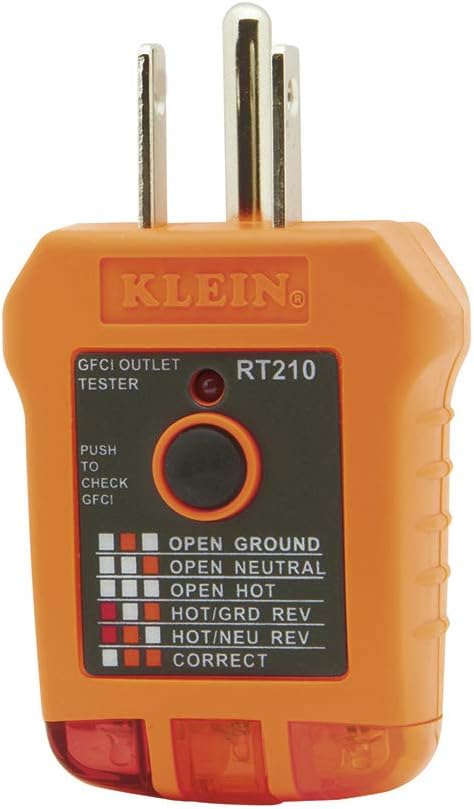

As an Amazon Associate, TestTalkHQ earns from qualifying purchases. All five cards are sourced only from the affiliate CSV with verified images. Catalog gap flagged by name: Klein Tools ET310 AC Circuit Breaker Finder with GFCI Tester (CSV row 92) has a Geniuslink URL but no Product Image URL — skipped as a card rather than substituting a non-matching image.
Complete ≠ verified. Remodels and memory labels fill every row without a field prove-out. Trace one load per row before you trust the card for lockout.
Fix proven mismatches first. Full rebuilds from memory recreate the same lies. Use the calculator to reprint after each verified change.
Start as a labeling/phase-map problem: wrong odd/even assignment stacks load. After rebalance, if both legs are high, move to subpanel or service upgrade decision pages.
Outlet testers prove receptacle circuits fast. Hardwired loads and multi-outlet strings still need a finder or controlled load method. ET310 is ideal for that workflow but lacks a CSV product image — see catalog gap above.
No. The guide teaches NEC 408.4 labeling and how to build a schedule. This page diagnoses failures when the schedule already looked finished.